Designing a new onboarding flow (NDA)

Please note, this work is subject to a Non-Disclosure Agreement (NDA). The designs shown below are recreated simulations based on the my original decisions and do not reveal actual product details.
Company
Blockpass
Role
Product Designer
Team
7 people
Timelime
April - June
Introduction
Blockpass specializes in identity verification solutions such as KYC, KYB, and AML for blockchain, cryptocurrency, and ICO projects. The company is also expanding its customer base to financial services, Web3 projects, decentralized services (DeFi), and highly regulated enterprises. Blockpass empowers users and businesses in the crypto world to interact in a secure, trustworthy, and transparent way, guaranteeing authentic user identities while protecting personal data privacy.
Introduction
Blockpass specializes in identity verification solutions such as KYC, KYB, and AML for blockchain, cryptocurrency, and ICO projects. The company is also expanding its customer base to financial services, Web3 projects, decentralized services (DeFi), and highly regulated enterprises. Blockpass empowers users and businesses in the crypto world to interact in a secure, trustworthy, and transparent way, guaranteeing authentic user identities while protecting personal data privacy.
Introduction
Blockpass specializes in identity verification solutions such as KYC, KYB, and AML for blockchain, cryptocurrency, and ICO projects. The company is also expanding its customer base to financial services, Web3 projects, decentralized services (DeFi), and highly regulated enterprises. Blockpass empowers users and businesses in the crypto world to interact in a secure, trustworthy, and transparent way, guaranteeing authentic user identities while protecting personal data privacy.
Context
Blockpass experienced a year of declining revenue due to several factors: global economic conditions, limited expansion of the target customer base, and poor conversion rates from free to paid plans…
With a large free-user base and no clear strategy to convert these users to paid subscriptions, the company struggled to meet revenue expectations.
Context
Blockpass experienced a year of declining revenue due to several factors: global economic conditions, limited expansion of the target customer base, and poor conversion rates from free to paid plans…
With a large free-user base and no clear strategy to convert these users to paid subscriptions, the company struggled to meet revenue expectations.
Context
Blockpass experienced a year of declining revenue due to several factors: global economic conditions, limited expansion of the target customer base, and poor conversion rates from free to paid plans…
With a large free-user base and no clear strategy to convert these users to paid subscriptions, the company struggled to meet revenue expectations.
Challenges
How might we increase task completion rates of the new onboarding flow?
How might we ensure task completion time under 15 minutes?
How might we present new plans with clear comparisons to increase conversion rates?
Challenges
How might we increase task completion rates of the new onboarding flow?
How might we ensure task completion time under 15 minutes?
How might we present new plans with clear comparisons to increase conversion rates?
Challenges
How might we increase task completion rates of the new onboarding flow?
How might we ensure task completion time under 15 minutes?
How might we present new plans with clear comparisons to increase conversion rates?
Research methodology
To align with Blockpass’s high-velocity Agile environment, I prioritized rapid MVP delivery over extensive upfront discovery by using lightweight methods. Research focused on validating and iterating designs immediately after deployment to staging/production using a data-informed triad:
Behavioral Analytics (Google Analytics): Monitored quantitative metrics including user flows, task success rates, and friction points (e.g., dead clicks) to identify UX bottlenecks.
In-product feedback: Utilized rating scales and open-ended prompts to capture immediate qualitative feedback and measure feature satisfaction.
Direct feedback from Operations team: Structured surveys with the Ops team to aggregate customer usability issues and support tickets.
Research methodology
To align with Blockpass’s high-velocity Agile environment, I prioritized rapid MVP delivery over extensive upfront discovery by using lightweight methods. Research focused on validating and iterating designs immediately after deployment to staging/production using a data-informed triad:
Behavioral Analytics (Google Analytics): Monitored quantitative metrics including user flows, task success rates, and friction points (e.g., dead clicks) to identify UX bottlenecks.
In-product feedback: Utilized rating scales and open-ended prompts to capture immediate qualitative feedback and measure feature satisfaction.
Direct feedback from Operations team: Structured surveys with the Ops team to aggregate customer usability issues and support tickets.
Research methodology
To align with Blockpass’s high-velocity Agile environment, I prioritized rapid MVP delivery over extensive upfront discovery by using lightweight methods. Research focused on validating and iterating designs immediately after deployment to staging/production using a data-informed triad:
Behavioral Analytics (Google Analytics): Monitored quantitative metrics including user flows, task success rates, and friction points (e.g., dead clicks) to identify UX bottlenecks.
In-product feedback: Utilized rating scales and open-ended prompts to capture immediate qualitative feedback and measure feature satisfaction.
Direct feedback from Operations team: Structured surveys with the Ops team to aggregate customer usability issues and support tickets.
Old design
After users signed up with their work email and verified it, they only saw a basic welcome screen before being sent straight to the dashboard. There was no onboarding flow at all.
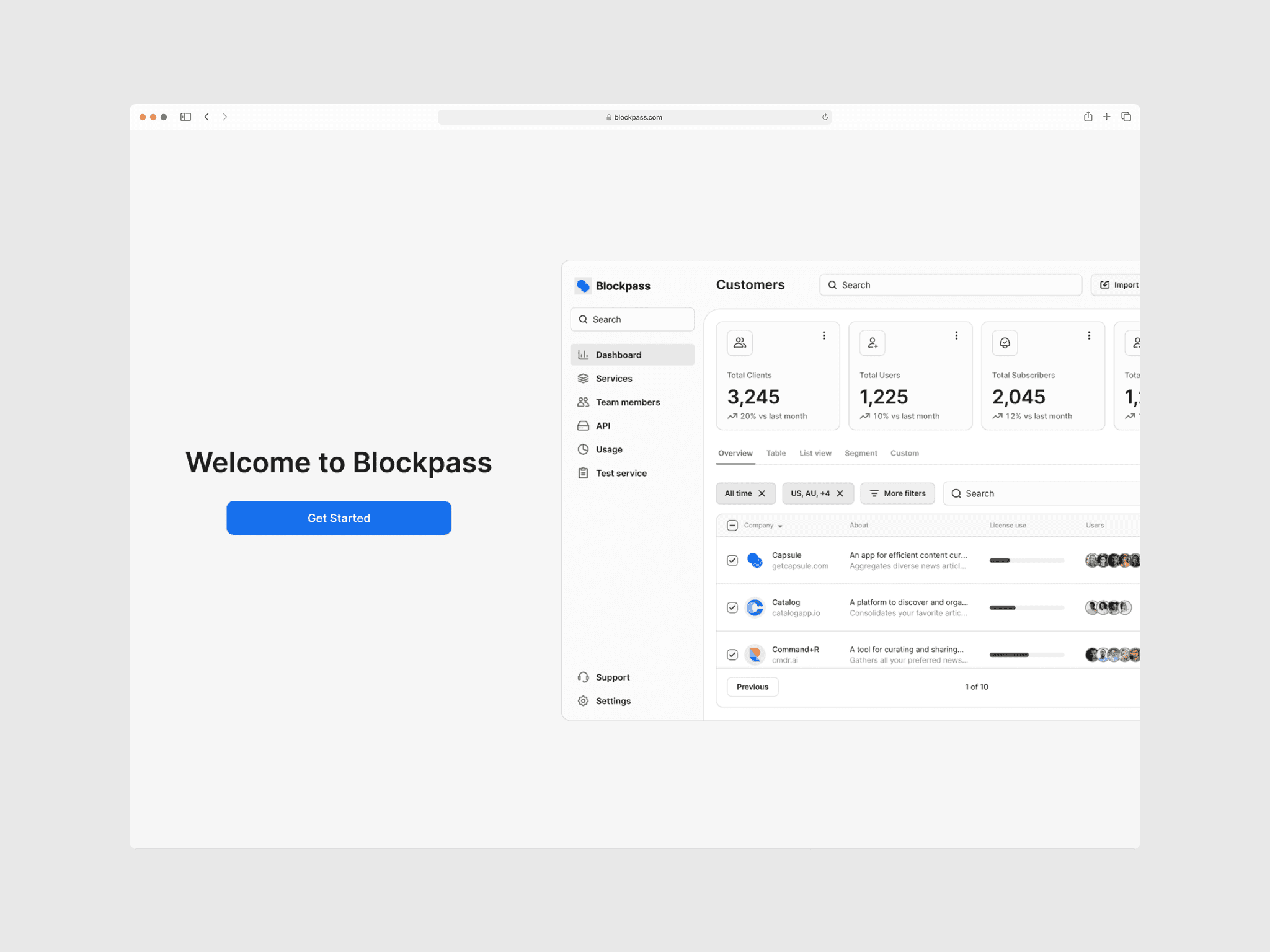
Old welcome screen
Old design
After users signed up with their work email and verified it, they only saw a basic welcome screen before being sent straight to the dashboard. There was no onboarding flow at all.
Old welcome screen
Old design
After users signed up with their work email and verified it, they only saw a basic welcome screen before being sent straight to the dashboard. There was no onboarding flow at all.
Old welcome screen
New onboarding
With the opportunity to redesign the company dashboard, I created a new onboarding flow with six clear steps and a progress indicator to boost completion rates (Goal-Gradient Effect).
The first step welcomes users to Blockpass with a straightforward 'Get Started' button.
Step 2 is a short information form for the Representative. I focused on collecting only the essentials to minimize cognitive load.
Step 3, aiming to help users find the right plan for their needs, I introduced a simple survey with selectable answers and to make this survey feel more meaningful and reduce skipping, I changed the skip button to say “Skip personalization.” This made it clear to users what they would miss and encouraged more people to take part in the survey.
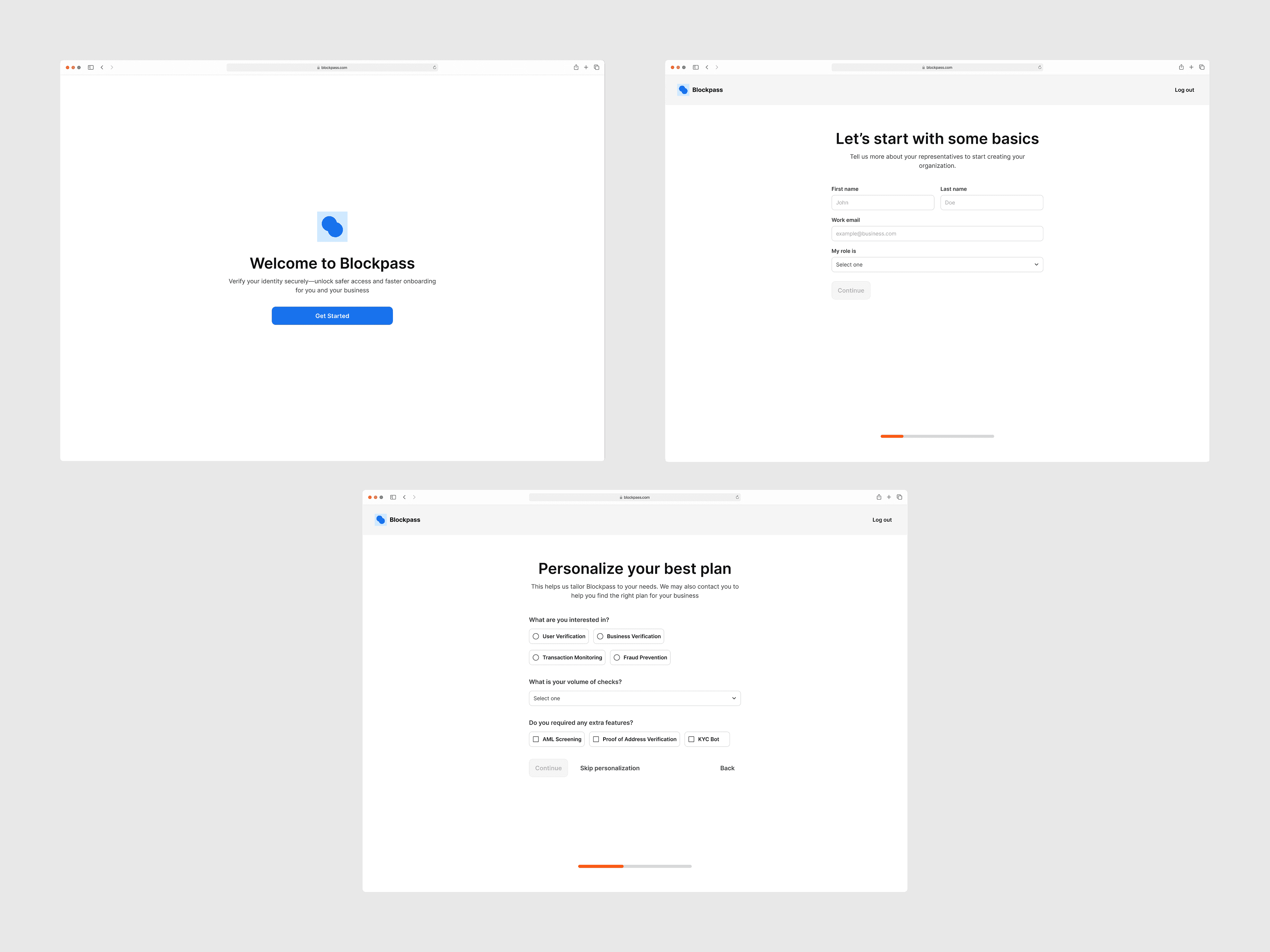
Step 1,2 & 3: Welcome screen (top left), Basic info form (top right), and Plan personalization questions (bottom)
New onboarding
With the opportunity to redesign the company dashboard, I created a new onboarding flow with six clear steps and a progress indicator to boost completion rates (Goal-Gradient Effect).
The first step welcomes users to Blockpass with a straightforward 'Get Started' button.
Step 2 is a short information form for the Representative. I focused on collecting only the essentials to minimize cognitive load.
Step 3, aiming to help users find the right plan for their needs, I introduced a simple survey with selectable answers and to make this survey feel more meaningful and reduce skipping, I changed the skip button to say “Skip personalization.” This made it clear to users what they would miss and encouraged more people to take part in the survey.
Step 1,2 & 3: Welcome screen (top left), Basic info form (top right), and Plan personalization questions (bottom)
New onboarding
With the opportunity to redesign the company dashboard, I created a new onboarding flow with six clear steps and a progress indicator to boost completion rates (Goal-Gradient Effect).
The first step welcomes users to Blockpass with a straightforward 'Get Started' button.
Step 2 is a short information form for the Representative. I focused on collecting only the essentials to minimize cognitive load.
Step 3, aiming to help users find the right plan for their needs, I introduced a simple survey with selectable answers and to make this survey feel more meaningful and reduce skipping, I changed the skip button to say “Skip personalization.” This made it clear to users what they would miss and encouraged more people to take part in the survey.
Step 1,2 & 3: Welcome screen (top left), Basic info form (top right), and Plan personalization questions (bottom)
Steps 4 and 5 cover the Pricing & Plan and Billing information screens.
Step 4 covers Pricing Strategy & Plan Selection. I designed this interface to trigger the Endowment Effect early in the user journey. By framing the plan selection as "claiming" an active 7-day trial rather than just "buying" a subscription, users feel they are securing an asset they already own. To support this decision, I used a dual-layout strategy:
Pricing cards: High-level summaries allow for quick, heuristic decision-making, anchoring the value proposition immediately.
Features breakdown: A detailed feature table provides transparency. This Progressive disclosure helps users rationalize their emotional choice with logic before moving to the next step.
Step 5: Billing Information and Plan Overview.
Billing information: The focus here shifts to reducing friction. I streamlined the data entry process for organization details to minimize cognitive load, ensuring the momentum gained in Step 4 isn't lost during administrative tasks.
Plan overview: Acts as a final "trust anchor," allowing users to verify their selection and eliminating any last-minute hesitation before commitment.
Step 6 is the payment stage, where users complete their transaction through a third-party payment provider.
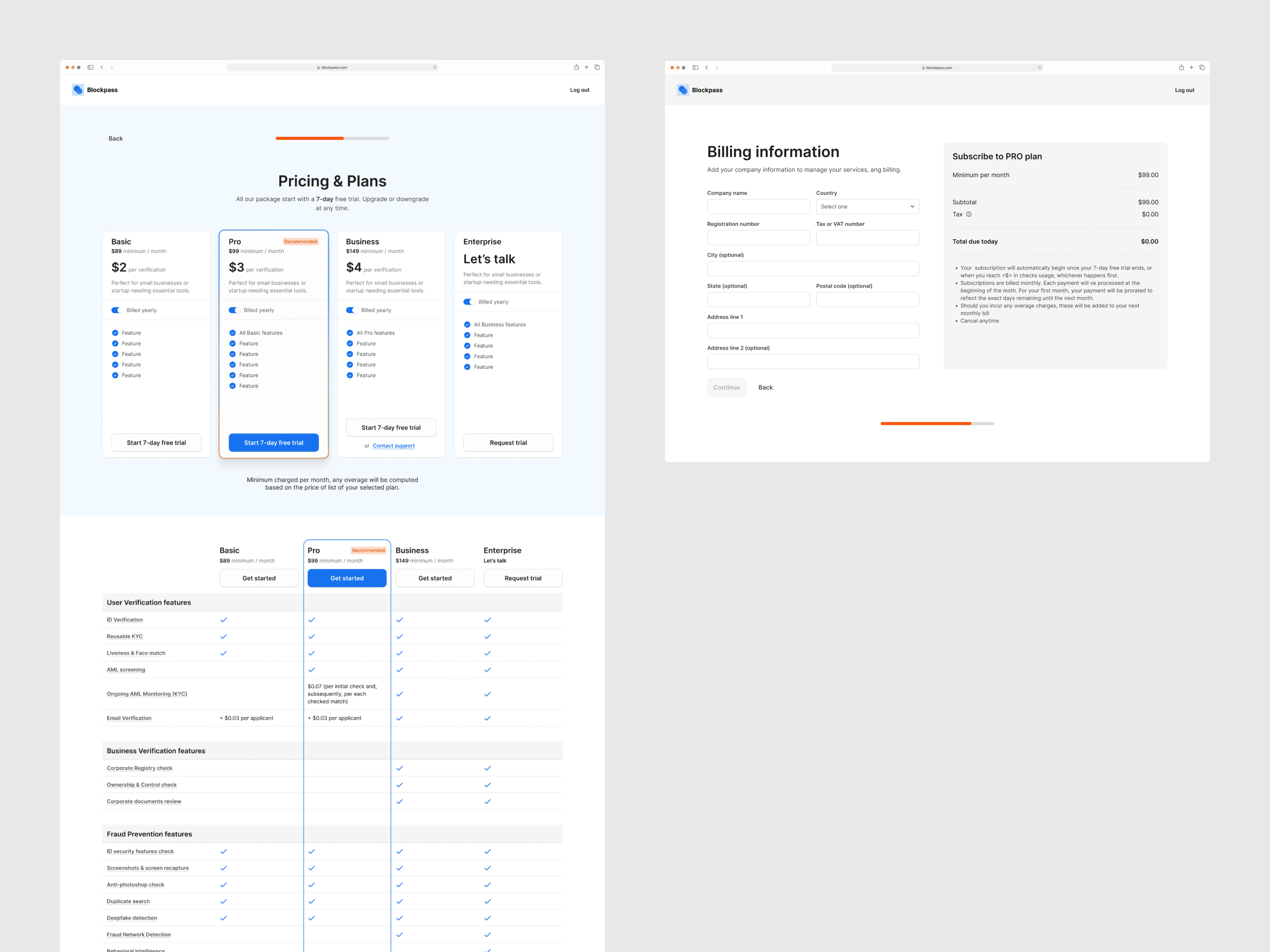
Step 4 & 5: Pricing and plan selection screen (left), followed by company billing information form (right)
Steps 4 and 5 cover the Pricing & Plan and Billing information screens.
Step 4 covers Pricing Strategy & Plan Selection. I designed this interface to trigger the Endowment Effect early in the user journey. By framing the plan selection as "claiming" an active 7-day trial rather than just "buying" a subscription, users feel they are securing an asset they already own. To support this decision, I used a dual-layout strategy:
Pricing cards: High-level summaries allow for quick, heuristic decision-making, anchoring the value proposition immediately.
Features breakdown: A detailed feature table provides transparency. This Progressive disclosure helps users rationalize their emotional choice with logic before moving to the next step.
Step 5: Billing Information and Plan Overview.
Billing information: The focus here shifts to reducing friction. I streamlined the data entry process for organization details to minimize cognitive load, ensuring the momentum gained in Step 4 isn't lost during administrative tasks.
Plan overview: Acts as a final "trust anchor," allowing users to verify their selection and eliminating any last-minute hesitation before commitment.
Step 6 is the payment stage, where users complete their transaction through a third-party payment provider.
Step 4 & 5: Pricing and plan selection screen (left), followed by company billing information form (right)
Steps 4 and 5 cover the Pricing & Plan and Billing information screens.
Step 4 covers Pricing Strategy & Plan Selection. I designed this interface to trigger the Endowment Effect early in the user journey. By framing the plan selection as "claiming" an active 7-day trial rather than just "buying" a subscription, users feel they are securing an asset they already own. To support this decision, I used a dual-layout strategy:
Pricing cards: High-level summaries allow for quick, heuristic decision-making, anchoring the value proposition immediately.
Features breakdown: A detailed feature table provides transparency. This Progressive disclosure helps users rationalize their emotional choice with logic before moving to the next step.
Step 5: Billing Information and Plan Overview.
Billing information: The focus here shifts to reducing friction. I streamlined the data entry process for organization details to minimize cognitive load, ensuring the momentum gained in Step 4 isn't lost during administrative tasks.
Plan overview: Acts as a final "trust anchor," allowing users to verify their selection and eliminating any last-minute hesitation before commitment.
Step 6 is the payment stage, where users complete their transaction through a third-party payment provider.
Step 4 & 5: Pricing and plan selection screen (left), followed by company billing information form (right)
Conclusion
This onboarding redesign was part of a broader upgrade of the company’s main product.
Over 40 hours of design work, I created 6 screens to support a short, structured onboarding journey that helps users complete basic setup, understand the product’s core value, and compare plans more easily.
The flow was defined around three main KPIs: onboarding completion rate, time to complete (<15 minutes), and conversion to paid plans.
Collaboration
I worked with PMs to align on business goals and success metrics, with developers to confirm technical feasibility and tracking events, and with the Operations team to gather recurring customer questions and post-launch feedback needs.
This ensured the onboarding concept was realistic to build and directly tied to revenue goals
Implementation
The new onboarding flow and related 6 screens were handed off with implementation specs and a basic tracking plan in Google Analytics.
Most new flows are being gradually implemented by the development team in QA and staging environments.
Impact & next steps
Because implementation was incomplete and I left before the full rollout, there is no reliable post-launch data yet to evaluate impact on conversion or revenue.
Before leaving, I proposed the following next steps for the team:
Monitor the onboarding funnel in Google Analytics (completion rate, drop-off by step, and time to complete).
Combine funnel data with in-product surveys and feedback from the Operations team to identify points of confusion.
Iterate on specific steps or copy that show high drop-off or unclear plan selection.
